
ConvenientReport1.2 - App Store
You'll be able to see results in few seconds.
Publisher Description
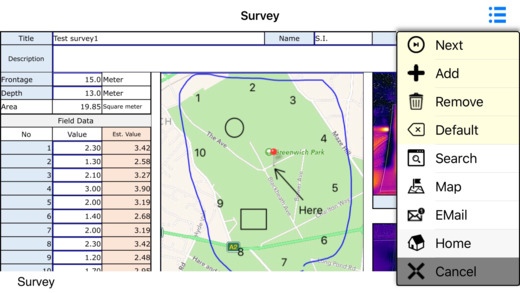
ConvenientReport is an App to increase significantly your productivity by empowering your smartphone and tablet.
In many cases, you can design database, data input screens and reports by yourself.
You can use ConvenientReport in many applications like equipment and facility inspection, field survey, estimation and proposal of face-to-face, GIS data collection, daily report, special calculator by excel functions, etc.
It is a useful tool that can be designed to suit your business.
ConvenientReport provides intuitive input screens of the same formats you use every day.
You can create reports pasting maps and photos on the fly and create the database at the same time.
You can send estimation or proposal sheets by email to your customers in face-to-face.
You can send daily reports or upload the collected data.
Of course, you don't need to re-input data.
You don't need experiences of programing.
You can design by the ConvenientReport designer easily.
Main functions are listed below.
- Data collection and report writing can be done simultaneously.
- You can carry calculation tables of the Excel functions you are using at the office every day.
- You can put the formats you are using everyday into your smart device.
- You can use location and map.
- Flexible search.
- Email report with pdf on the fly.
- Flexible and powerful designer.
- Excel format report.
* Subscription
If you want to create and use your own report projects, you need to purchase a subscription. This subscription provides a report project designer and the synchronization function as described below.
1. ConvenientReport Desktop designer
ConvenientReport Desktop designer is an application for designing your report projects and manipulating your collected data. Currently, it works on Windows PC only. The main functions of this designer are listed below.
- Creating your own report project using an Excel file as report design.
- Designing database for your purpose.
- Importing data through csv or Excel files.
- Connecting between the report design Excel and the database using a graphical method.
- Setting the easy-to-use input methods on this App to each report cells.
- Setting up location data for each database records for mapping use.
- Creating image database for selections.
- Uploading report projects to your Microsoft OneDrive folder. Microsoft OneDrive is free up to 5 GB.
- Downloading collected data.
- Generating Excel format reports.
- Creating team report projects and manipulating the collected data.
- Using SQL query for advanced use.
You can download freely the ConvenientReport Desktop designer including future version up from our support web site. Sample projects are also available. You can try this designer even if you have not purchased this subscription.
2. Synchronization
You can download the report projects from your Microsoft OneDrive folder and use them in this ConvenientReport App. And after you collected data, you can upload those data. Only the changed files will be downloaded or uploaded.
Subscription purchase information are described below.
- The length of the subscription is one year.
- The price of the subscription is $9.49.
- This subscription will continue unless canceled in Settings at least one day before a subscription period ends.
Requires iOS 8.4 or later. Compatible with iPhone, iPad, and iPod touch.
About ConvenientReport
The company that develops ConvenientReport is AToI LLC. The latest version released by its developer is 1.2.
To install ConvenientReport on your iOS device, just click the green Continue To App button above to start the installation process. The app is listed on our website since 2016-09-22 and was downloaded 0 times. We have already checked if the download link is safe, however for your own protection we recommend that you scan the downloaded app with your antivirus. Your antivirus may detect the ConvenientReport as malware if the download link is broken.
How to install ConvenientReport on your iOS device:
- Click on the Continue To App button on our website. This will redirect you to the App Store.
- Once the ConvenientReport is shown in the iTunes listing of your iOS device, you can start its download and installation. Tap on the GET button to the right of the app to start downloading it.
- If you are not logged-in the iOS appstore app, you'll be prompted for your your Apple ID and/or password.
- After ConvenientReport is downloaded, you'll see an INSTALL button to the right. Tap on it to start the actual installation of the iOS app.
- Once installation is finished you can tap on the OPEN button to start it. Its icon will also be added to your device home screen.
Program Details
System requirements
Download information
Pricing
Version History
version 1.2
posted on 2016-09-22
Disclaimer
Official App Store Link
We do not host ConvenientReport on our servers. We did not scan it for viruses, adware, spyware or other type of malware. This app is hosted by Apple and passed their terms and conditions to be listed there. We recommend caution when installing it.
The App Store link for ConvenientReport is provided to you by apps112.com without any warranties, representations or guarantees of any kind, so access it at your own risk.
If you have questions regarding this particular app contact the publisher directly. For questions about the functionalities of apps112.com contact us.
